Updated
Google DeepMind
Gemini Omni Flash 1.1
Google DeepMind's Gemini Omni Flash 1.1: video with first and last frame control, up to 4K.
What is Gemini Omni Flash 1.1?
Gemini Omni Flash 1.1 is the update to Google DeepMind's Gemini Omni Flash video model, launched on August 27, 2026.
Like Gemini Omni 1.0, it reads text, images and video together and makes one clip with sound. The addition on Flashloop is first and last frame control, so you can pin how a shot starts and ends.
On Flashloop it renders 4, 6, 8 or 10 seconds at 720p, 1080p or 4K in 16:9 or 9:16, with native audio on every clip. You can attach up to 7 reference images or up to 3 saved characters, or one reference video of up to 10 seconds for video-to-video edits. Frames and references cannot be combined in one generation.
Google's launch post also describes longer scene extension and 360p previews. Flashloop does not offer either, so plan around 10 seconds per clip. Video editing and extension are blocked in the EEA, Switzerland and the UK under Google's API policy. For the original model, see Gemini Omni.
- Provider
- Google DeepMind
- Length
- 10 seconds
- Resolution
- 720p, 1080p, 4K
- Aspect ratios
- 16:9, 9:16
- Audio
- Native audio
What you can do with Gemini Omni Flash 1.1
First and last frame
set a start image and an optional end image and the model fills the motion between them
Native audio
sound is generated with the picture on every render
Reference images
up to 7 per generation, or up to 3 saved characters
Video-to-video
attach one clip of up to 10 seconds to edit or rework it
Up to 4K output, at 16:9 or 9:16
Prompts to try with Gemini Omni Flash 1.1
“Start on the first frame, a closed wooden door in a quiet hallway. End on the last frame, the same door open onto a sunlit garden. The camera pushes forward slowly as the door swings open, with the sound of a latch and birdsong. A single continuous shot, 6 seconds, 16:9.”
Where Gemini Omni Flash 1.1 fits best
Camera moves between two frames
Give a start frame and an end frame and let the model build the move between them.
Travel and landscape footage
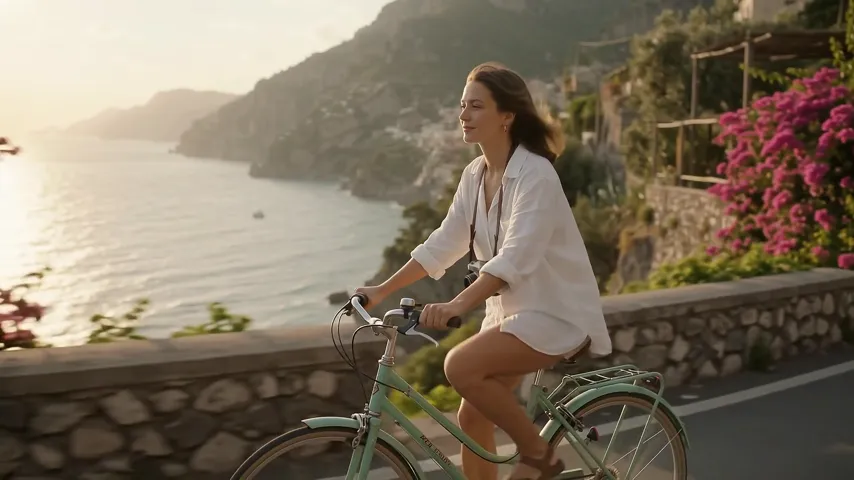
Short 4K scenes of coastlines, lakes and beaches with generated sound.
Product reveals
Start on a close detail, end on the full product and get a clean transition with audio.
Reworking an existing clip
Attach a clip of up to 10 seconds and describe the change you want.
Vertical and landscape from one brief
Render the same scene in 16:9 for web and 9:16 for social.
How Gemini Omni Flash 1.1 compares
| Model | Length | Top resolution | Aspect ratios | Native audio |
|---|---|---|---|---|
| Gemini Omni Flash 1.1 | 10 seconds | 4K | 16:9, 9:16 | Yes |
| Veo 3.1 | 8 seconds | 1080p | 16:9 | Yes |
| Kling 3.0 | 15 seconds | Pro (1080p) | 16:9, 9:16, 1:1 | No |
| Kling 3.0 Turbo | 15 seconds | 1080p | 16:9, 9:16, 1:1 | No |
| Kling 4.0Coming soon | 30 seconds | To be confirmed | To be confirmed | Yes |
Good to know before you generate
- First and last frames cannot be combined with reference images, characters or a reference video in the same generation
- Clips cut between shots unless the prompt asks for a single scene, per Google's documentation
- Clips run 4, 6, 8 or 10 seconds on Flashloop
- Video input is limited to one clip of up to 10 seconds
- Google blocks video editing and extension in the EEA, Switzerland and the UK under its API policy
- Flashloop offers 16:9 and 9:16 only
Start creating with Gemini Omni Flash 1.1
Create with Gemini Omni Flash 1.1Select Gemini Omni Flash 1.1
Open Flashloop and choose Gemini Omni Flash 1.1 from the model selector in the video creator.
Enter your prompt
Describe what you want to see in your video.
Generate and download
Hit generate and your video will be ready in seconds. Download or share directly.
Questions about Gemini Omni Flash 1.1
What is new in Gemini Omni Flash 1.1?
Google launched it on August 27, 2026. On Flashloop the difference from Gemini Omni 1.0 is first and last frame control. Durations, resolutions and reference limits are otherwise the same.
Can I set a start and an end frame?
Yes. Add a first frame and, if you want, a last frame, and the model animates the move between them. A generation with frames cannot also use reference images, characters or a reference video.
Does Gemini Omni Flash 1.1 generate audio?
Yes. Audio is generated natively with the video and is always on.
What durations, resolutions and aspect ratios does it support?
4, 6, 8 or 10 seconds, at 720p, 1080p or 4K, in 16:9 or 9:16.
How many references can I use?
Up to 7 reference images, up to 3 saved characters, and one reference video of up to 10 seconds for video-to-video edits.
Does the duration setting apply when I attach a video?
No. With a reference video attached, the model picks the clip length itself, up to 10 seconds.
Why does my clip cut between shots?
Google's documentation says the model makes multi-shot clips by default. Ask for a single scene or one continuous shot in the prompt to get a single take.
Can I use it in the EEA, Switzerland or the UK?
Google blocks video editing and extension in those regions under its API policy. That limit applies to video-to-video edits.
More video models on Flashloop
 Veo 3.1
Google DeepMind's Veo 3.1: 8-second videos with dialogue, sound effects and ambience generated in one pass.
 Kling 3.0
Kuaishou's Kling 3.0: multi-shot video up to 15 seconds, with consistent characters across cuts.
- Kling 3.0 Turbo
Kuaishou's faster, cheaper Kling 3.0: text and image to video at 720p or 1080p, up to 15 seconds.
 Kling 4.0
Kuaishou's Kling 4.0, announced September 28, 2026: native 30-second clips, up to 10 keyframes, full release in October.